How do I upload iOS builds to TestFlight for internal testing only?
Last updated: July 27, 2026
Context
When uploading your iOS builds to TestFlight, you may want to ensure the builds are available only for internal testing and not ready for App Store submission. By default, builds uploaded through Codemagic may show up as
“Ready to Submit” ❌ (looks like a release candidate)
instead of“Testing” ✅ (internal TestFlight build)
This happens because the export options passed during the Xcode archive step influence how App Store Connect interprets the build.
Answer
To explicitly mark your builds as internal TestFlight-only builds, add the following environment variable to your Codemagic workflow:
XCODE_PROJECT_CUSTOM_EXPORT_OPTIONS={"testFlightInternalTestingOnly": true}In Workflow Editor:
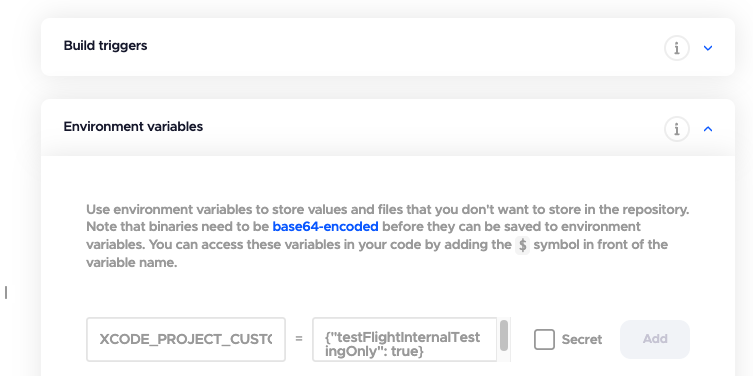
Or if you are using codemagic.yaml
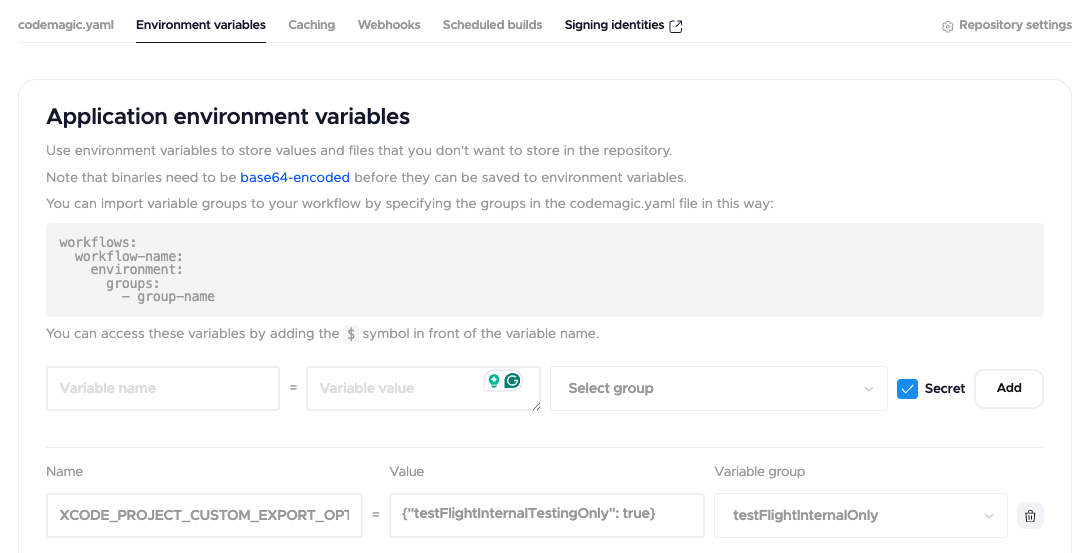
then reference the variable group in your yaml
      environment:
          groups:
            - testFlightInternalOnly
After the build finishes successfully your builds uploaded through CI/CD will show the "Testing" status in TestFlight and will be available only for internal testing