How to fix Google Play changes_not_sent_for_review errors in Codemagic?
Last updated: June 26, 2026
Context
When publishing apps to Google Play using Codemagic, you might see conflicting errors related to the changes_not_sent_for_review parameter.
For example:
One app asks you to set
changes_not_sent_for_review: trueAnother app says this parameter must not be set
This commonly happens when managing multiple apps, especially whitelabel apps, where each app may have a different review status in Google Play.
Answer
This behavior is expected. Google Play evaluates each app independently based on its current review and publishing status, not your CI/CD configuration.
Key idea
Simple apps (single app projects): You usually encounter only one scenario depending on your app’s status.
Whitelabel or multiple apps: Different apps can require different configurations at the same time.
Scenario 1: App requires changes_not_sent_for_review: true
Error message:
Changes cannot be sent for review automatically. Please set the query parameter changesNotSentForReview to true.
Why this happens:
The app was previously rejected by Google Play
Google does not allow automatic resubmission via API
What to do:
Add this to your configuration:
publishing:
  google_play:
    credentials: $GCLOUD_SERVICE_ACCOUNT_CREDENTIALS
    track: internal
    changes_not_sent_for_review: true
Then manually submit the app for review in the Google Play Console
Scenario 2: App must NOT use changes_not_sent_for_review
Error message:
Changes are sent for review automatically. The query parameter changesNotSentForReview must not be set.
Why this happens:
The app is in good standing
Managed publishing or automatic review submission is enabled
What to do:
Remove the parameter from your config:
publishing:
  google_play:
    credentials: $GCLOUD_SERVICE_ACCOUNT_CREDENTIALS
    track: internal
    # Do not include changes_not_sent_for_review
Important for whitelabel apps
If you're publishing multiple apps:
Each app may be in a different state (rejected, approved, draft, etc.)
You must configure
changes_not_sent_for_reviewper app, not globally
This is why one app in your pipeline may require the flag, while another fails because of it.
Workflow Editor Tip
If you're using the Codemagic UI:
Toggle "Do not send changes for review" depending on the app’s requirement
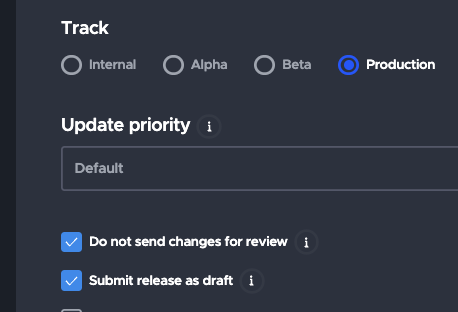
Note on submit_as_draft
submit_as_draft: Creates a draft release (not published)changes_not_sent_for_review: Uploads changes without submitting for review
They serve different purposes and are not interchangeable.
Summary
There is no single correct setting for all apps
Always adjust based on the individual app’s Google Play status
This is especially important for whitelabel or multi-app pipelines
For more detailed information about common Google Play errors, refer to the Codemagic troubleshooting documentation.